
Get more out of your on-demand strategy
Learning goal: make use the webinar channel for your on-demand strategy
Get more out of your on-demand webinars with your own webinar channel. With the webinar channel of WebinarGeek, you can show your webinars to your target group in a unique and simple way. Your webinar channel is a page where all your webinars are displayed in one list.
It is a fantastic way to promote on-demand and upcoming webinars. A unique place where you can display and announce them!
What is an on-demand webinar?
With an on-demand webinar you can give the viewer the option of watching the webinar at the time of their choosing. The viewer can also pause and rewind the webinar. They register in advance with name and email. You can see exactly at what time and by whom the webinar is watched. During the on-demand, the chat function and other interactive tools can be used. If someone uses the chat function, you will immediately receive it in your email and you can respond.
An on-demand webinar is very suitable if you want to continue generating leads after your live webinar. In addition, you continue to collect valuable statistics, allowing you to send highly targeted follow-up emails.
Place your channel on your own website!
Do you have a website or blog where you receive (many) visitors? Then place the embed code directly on your website. You just have to copy and paste the HTML code on to your website. The handy thing about this is that your visitors can see all your webinars in one overview.
The advantages:
Handy overview
More impact with on-demand webinars
You continue to generate leads
A platform for your webinars
On-demand webinar strategy
We know that an on-demand webinar is a great way to keep generating leads. The webinar channel is therefore amazing for keeping your on-demand webinar permanently on the radar. Add your on-demand webinars to your channel and offer an overview of all your content.
Advantages on-demand webinar strategy:
Not time-bound
You continue to collect emails
Respond directly to live questions
You continue to collect statistics & leads in the background
How do I create a webinar channel?
Creating a webinar channel is done with a few clicks. Go to the main menu and click "Channel". Then click on "Create your own channel".
Attention: for creating a webinar you need a premium account!
Generate more leads webinar channel
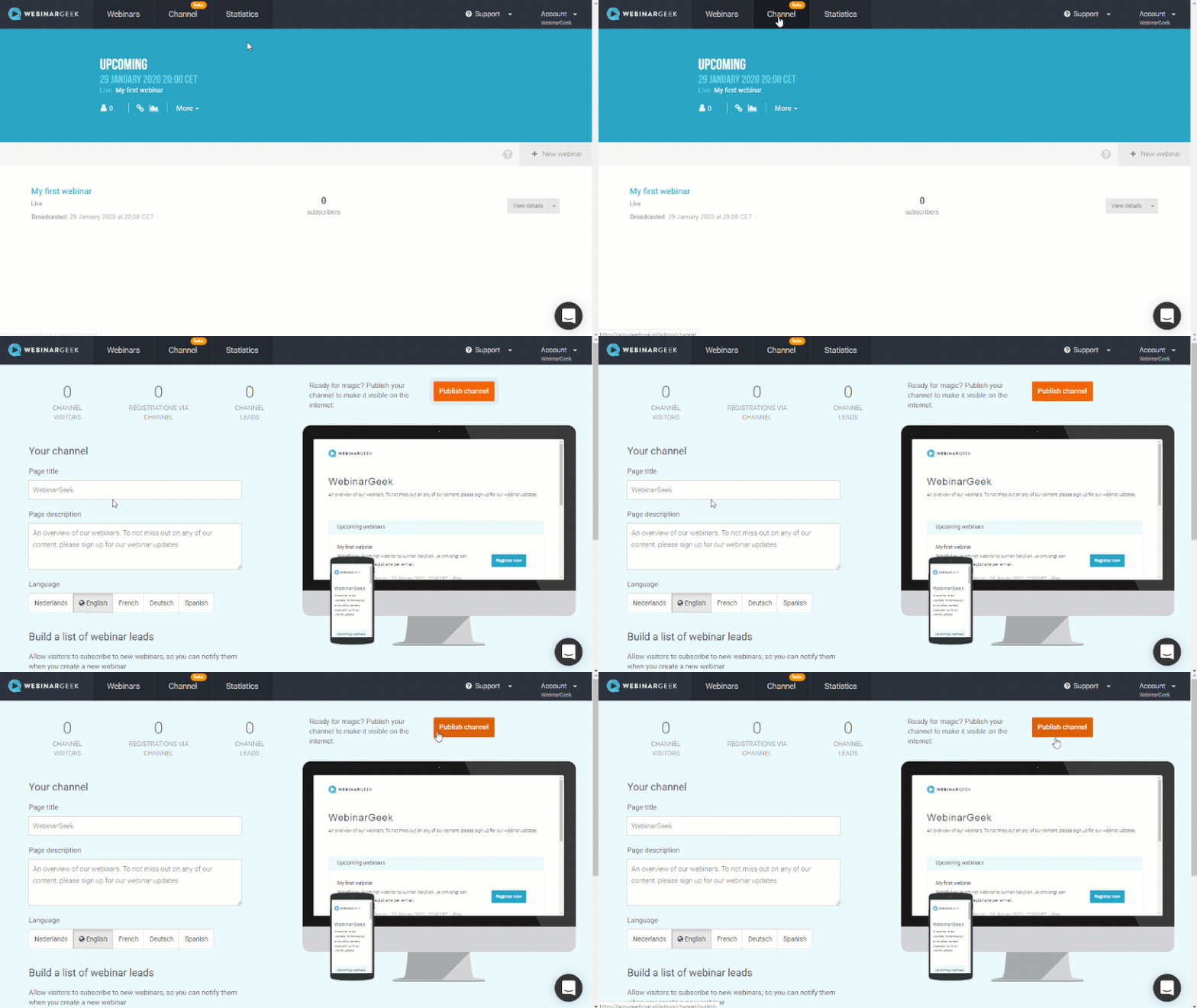
Visitors to your webinar channel have the option to sign up for future updates. As soon as you publish a webinar, they will automatically receive a reminder about this.
The webinar channel is easy to use and fully optimized for the Google search engines. Do you want to continue generating leads with on-demand webinars? Then use our webinar channel!
What did I learn?
What a webinar channel is
What an on-demand webinar is
How I can generate more leads with an on-demand webinar strategy
Next courses

Erstelle ein On-Demand-Webinar
Erlebe die Vorteile von On-Demand-Webinaren mit dieser Schritt-für-Schritt-Checkliste. 🚀
Akademie: KI x Webinare
Explore how to use AI to create content for your webinars.

Masterclass: Content-Wiederverwendung
Lerne, wie du deine Inhalte recycelst. Schau dir die WebinarGeek Masterclass an und werde ein Experte.

Generiere Leads mit aufgezeichneten Webinaren
Entdecke clevere Strategien, um das Beste aus deiner Webinar-Aufzeichnung herauszuholen! Steigere die Interaktion, sammle Leads und erlebe den Zauber des Live-Events erneut. Lass uns starten! 🚀

3 Bewährte Webinar-Strategien
In diesem Video tauchen wir mit WebinarGeek in die Welt der Webinare ein und stellen dir drei erprobte Strategien vor, die garantiert zum Erfolg führen. Steigere jetzt deinen Erfolg!

Zapier – Integriere mit 6.000+ Apps
Automatisiere Workflows, um Webinare effektiver und effizienter zu hosten.

Das 2025 Webinar Playbook für Coaches
Ein praktischer Leitfaden für Coaches, die wachsen wollen, ohne sich selbst zu verlieren. Dieses Playbook verzichtet auf leere Motivationsfloskeln und kommt direkt zur Sache: Wie nutzen echte Coaches Webinare, um mehr Menschen zu erreichen, Zeit zu sparen und trotzdem persönlich zu bleiben?

Getting started with webinars
Better your skills to create more impact with webinars
Entdecke alle Webinar-Typen
Ein Live-Webinar ist am bekanntesten, aber es gibt noch viele weitere. Entdecke die Vorteile der verschiedenen Webinar-Arten.

Optimiere deine Webcam mit OBS Teil 2
Verbessere die Bildqualität deiner Webcam mit OBS! Lerne, wie du Einstellungen wie Weißabgleich, Gamma und mehr anpasst, um ein professionelles Erscheinungsbild zu erzielen.