
What kind of webinars are there?
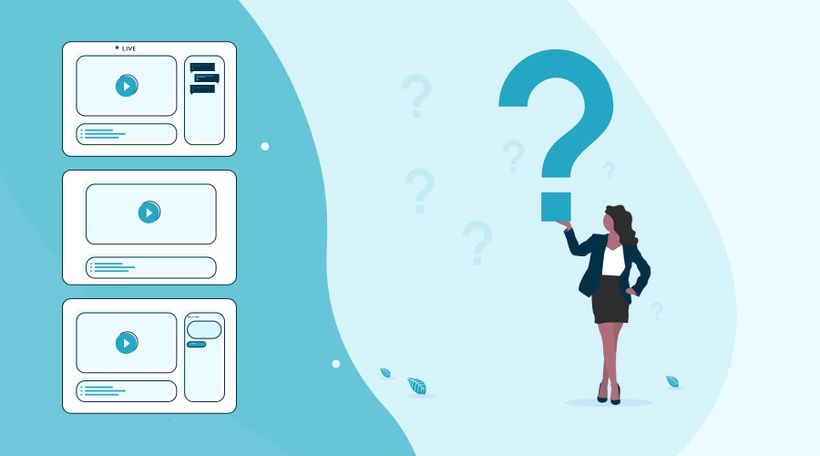
LEARNING GOAL: What kind of webinars can I use?
In the world of webinars, there are three types of webinars. The live webinar, automated webinar, and the on-demand webinar. Based on your objectives you will determine which type of webinar is the most suitable.
Start with your first webinar
An important first step in organizing a webinar is to think carefully about the question "why do you want to organize a webinar?","What do you want to achieve with your webinar?"
Properly establishing your objectives ensures you can measure afterward what went well and where you can still make improvements.
Those goals can be anything. For example, generate more leads, reach new potential customers, or increase the number of contact moments with existing customers. Also, think about increasing your mailing list. This is an important reason for many people to start using webinars.
If you have formulated the objectives, it is important to consider for whom you will give the webinar. Who do you want to reach with a webinar?
So try to describe your target group as concretely as possible. A well-known saying, "if you try to serve them all, you will serve none" is very appropriate here. By clearly formulating your target group and including this in your promotion, you address people personally and they will feel more likely to participate in your webinar.
What kind of webinar do I want to give to reach my goals and what is my target audience?
Automated webinar
You record your webinar in advance with an automated webinar. This allows you to make your webinar flawless. You can also make the webinar as attractive as possible visually. With our intuitive webinar software, you ensure that you can broadcast the webinar as if the broadcast were "live". Also, the viewer can ask questions during the webinar, so you have the extensive opportunity to interact with the viewer.
If you are not yet completely comfortable with the camera, an automated webinar can offer a good solution.
On-demand webinar
An on-demand webinar gives the viewer the option to view the webinar at a time of their choosing. The viewer can, among other things, pause and rewind the webinar. The viewer registers with his name and email so that you can see exactly at what time and by whom the webinar was viewed. During the on-demand webinar, chat function and other interactive tools can be used. If someone uses the chat function, you will immediately receive it in your mail and you can respond.
An on-demand webinar is very suitable if you want to continue generating leads after your live webinar. Potential viewers have to register when they want to watch the on-demand webinar. Besides, you continue collecting valuable statistics, allowing you to send highly targeted follow-up emails.
With WebinarGeek you can create any type of webinar in an instant. Our software stands for user-friendliness and simplicity. The result is webinar software that makes everyone happy!
What did I learn?
With which objective should I make a webinar
What types of webinars can I create
Next courses

10 Tipps für mehr Registrierungen von Onomondo
In diesem Webinar tauchen wir in die entscheidende Rolle von Webinaren ein – das Teilen wertvoller Erkenntnisse.

Benchmark 2025 report
Ein Webinar zu organisieren ist erst der Anfang. Um wirklich erfolgreich zu sein, ist es wichtig, das Beste daraus zu machen. In diesem Benchmark-Bericht findest du hilfreiche Zahlen und Tipps zur Webinar-Performance. Erfahre, wie sich mehr Menschen anmelden, wie sie bis zum Ende dabeibleiben und wie Erinnerungs-E-Mails besser für mehr Engagement sorgen.

3 Bewährte Webinar-Strategien
In diesem Video tauchen wir mit WebinarGeek in die Welt der Webinare ein und stellen dir drei erprobte Strategien vor, die garantiert zum Erfolg führen. Steigere jetzt deinen Erfolg!

Registration process from A to Z
Create a successful webinar by setting up the registration process in the right way

Zapier – Integriere mit 6.000+ Apps
Automatisiere Workflows, um Webinare effektiver und effizienter zu hosten.
Warum du einen guten Webinar-Hostingraum brauchst
Lass uns eintauchen in die Bedeutung des richtigen Webinar-Hostingraums für erfolgreiche Online-Präsentationen. Erfahre, wie die richtige Einrichtung deine Webinare verbessern, dein Publikum einbinden und für einen reibungslosen Ablauf von Anfang bis Ende sorgen kann.

Erstelle dein erstes Webinar: Ein Leitfaden für Einsteiger
Bereit für dein erstes Webinar? Schau dir unsere Videoserie „Ein Leitfaden für Einsteiger“ an – wir zeigen dir alles: von der Zielsetzung bis zur Themenwahl. Erfahre, wie du mit den Tools von WebinarGeek den Ablauf optimierst.

Optimiere deine Webcam mit OBS Teil 2
Verbessere die Bildqualität deiner Webcam mit OBS! Lerne, wie du Einstellungen wie Weißabgleich, Gamma und mehr anpasst, um ein professionelles Erscheinungsbild zu erzielen.

Getting started checklist
Eine praktische Liste mit allen wichtigen Informationen darüber, wie du ein Webinar aufsetzt. Gib deine E-Mail-Adresse ein und erhalte die praktische Getting Started-Checkliste.

Skaliere deinen Lead-Generierungs-Funnel mit WebinarGeek
WebinarGeek teilt seine Expertise zur Nutzung der Kraft von Webinaren für die Lead-Generierung.