
Optimize the registration process with integrations
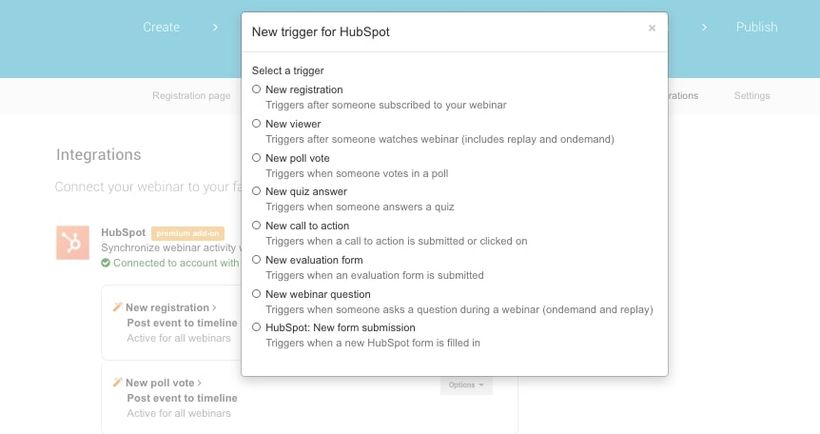
LEARNING GOAL: knowing how I can streamline the registration process by using integrations.
Integrations have been created to make life easier. So it would be a shame to not use any during the registration process. There are several different software tools you can integrate with WebinarGeek. Let’s have a look at some of them:
Hubspot
WebinarGeek offers the option to send data that is processed in your webinar to the Hubspot CRM system. And that’s handy when you want to follow up on leads. You can access information about participants directly in Hubspot, which enables you to easily segment the participants, based on, for example, the latest date on which your contact has watched a webinar. Then create a suiting email campaign and send the emails directly to the participants. Couldn’t be easier!
Besides participant data, Hubspot also receives information about viewer behavior, interactions, and evaluation forms. In this way, all your webinar participant data is stored in one place.
ActiveCampaign
Emails, such as the confirmation email and replay emails, can be sent outside of WebinarGeek. That’s where the ActiveCampaign integration comes into play. With this integration viewers, non-viewers and registrants are automatically added to your mailing list.
The benefit of this is that you can easily build email campaigns based on your participants’ viewing behavior. But of course, you can also send all WebinarGeek emails through ActiveCampaign. In the replay email, for example, the replay links are directly transferred to ActiveCampaign, so you don’t have to copy these yourself.
Facebook Pixel
Facebook Pixel makes remarketing, optimizing, and conversion tracking of your Facebook ads easy. The WebinarGeek integration helps you to easily make ads for your next webinar. It also offers the possibility to measure conversion from visitors to registrations for your webinar.
Setting up Facebook Pixel on your website can be quite challenging. Because we want to make it as simple as possible, you don’t have to worry about codes and settings. The link with WebinarGeek makes sure that Facebook Pixel is automatically shown on your public pages. All you have to do is set up the link. WebinarGeek does the rest.
Would you like to know which other integrations can be linked with WebinarGeek? Have a look at our Integrations page. Can’t find your tool on the list? Maybe you can use Zapier to link your integration to WebinarGeek.
Zapier
Zapier is a tool that lets you link thousands of other applications with WebinarGeek. Chances are that your favorite software can be found here as well. Would you like to add registrants directly to your mailing list, but do you not use ActiveCampaign or Mailchimp? Then search Zapier’s application list for your mailing system.
In chapter 4, we already talked about different payment tools besides Mollie. Through Zapier you can link tools such as PayPal or Stripe with WebinarGeek. In this way, you can organize a paid webinar using your favorite payment tool. Would you like to learn more about this? Have a look at our [English spoken webinar], in which we explain how to link integrations like Stripe and PayPal.
Linking WebinarGeek and Zapier is very easy. All you need are a Zapier account and a WebinarGeek account with available marketing integrations.
Integrations are also very easy to use, they can save you a lot of time and make sure that you can automate a big part of the registration process. Check which software you use and see how you can link this with WebinarGeek to take your registration process to a whole new level.
What have I learned?
What the benefits of integrations are in WebinarGeek
What I can do with WebinarGeek integrations
What I can do with Zapier
Next courses

Optimiere deine Webcam mit OBS – Teil 1
Steigere die visuelle Wirkung deines Webinars! Lerne, wie du dein Webcam-Bild mit OBS optimierst. Helligkeit, Kontrast, Sättigung und Schärfe – beherrsche diese Einstellungen für eine überzeugende Präsentation.

E-Mails & Webinare
E-Mail-Marketing und Webinar-Marketing gehen Hand in Hand. Lade den Leitfaden herunter, um zu lernen, wie du den Erfolg von Webinaren mit Hilfe von E-Mail-Marketing steigern kannst.
Organisiere epische Webinare mit RTMP
Upgrade dein Webinar-Erlebnis! Lerne, wie du OBS, den Atem Mini Pro und RTMP nutzt, um die beste Qualität zu erzielen.

10 Tipps für mehr Registrierungen von Onomondo
In diesem Webinar tauchen wir in die entscheidende Rolle von Webinaren ein – das Teilen wertvoller Erkenntnisse.

Datenverwaltung mit Salesforce durch MarTech Do
Das Salesforce-Ökosystem stellt sicher, dass du das Beste aus deinen CRM-Systemen für Marketing und Vertrieb herausholst.
Dein Ultimatives Elgato-Setup – Komplette 3-teilige Videoserie
Lerne in dieser 3-teiligen Serie, wie du das ultimative Elgato-Setup erstellst—vom Unboxing über die Software bis zur vollständigen Live-Einrichtung für besseres Streaming.

Erstelle einen Content-Kalender mit Intercom
Intercoms Transformation von keinem Content-Kalender zu einer vollständigen Strategie und einem durchdachten Content-Kalender.

Wie Du Dein Webinar auf Social Media Bewerben Kannst
In diesem Video zeigen wir dir unsere besten Tipps und Tricks, um dein Webinar auf Social Media zu bewerben. Von der besten Plattform für dich bis zur effektiven Nutzung eines Call-to-Actions!

Wie du Webinare mit vMix streamst – Teil 2
Setze deine Phoenix-Reise fort! In Teil 2 unserer Serie tauchen wir in das Hinzufügen von Videos, Bildschirmaufnahmen und die Beherrschung von Übergängen ein. Begleite uns, um deine Streaming-Leistung mit vMix auf das nächste Level zu bringen.

Organisiere Webinare für den Verkauf
Beziehe dein Publikum ein und verwandle Zuschauer in Kunden mit diesen nützlichen Features.