

Smarter webinars, powered by AI
WebinarGeek’s AI features help you get more value from every webinar, without adding more work before or after the session.
No credit card required · 14-day free trial · Cancel anytime
5,000+ companies in more than 55 countries use our webinar software


















Features for every stage of your webinar
Five powerful AI features, each designed to support a different part of your webinar workflow.
Live webinar captions
Make your webinar easier to follow with live captions in multiple languages.
Automatic chapters
AI chapters help viewers jump to what matters.
Performance analysis
Get clear AI insights on performance, engagement, and what to improve next.
Content tips
Get AI suggestions for your title, description, and CTA to help increase sign-ups.
AI Assistant
Give attendees instant answers, powered by your content.
Built-in, zero setup
AI is built into WebinarGeek. No plugins, extra tools, or separate accounts needed.
From planning to performance insights
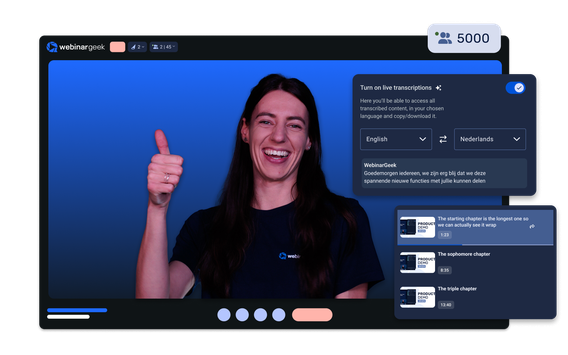
Prepare and engage live
Use AI to improve your title, description, and CTA before publishing. Once live, WebinarGeek helps attendees follow along with captions, translations, and instant AI chat answers.
Sharper titles that attract the right people
Captions that make every point easier to follow
Let AI handle quick questions while you host
See WebinarGeek's AI in action
Watch short demos of how AI helps before, during, and after your webinar.
Browse all videos
Prepare your webinar faster
Use AI to sharpen your webinar content before you publish. Get suggestions for titles, descriptions, and calls-to-action that help drive more sign-ups.

Support the audience live
Make your live webinar easier to follow with captions, translations, and AI-powered chat support that helps attendees get answers in real time.

See how your webinar performed
After each live or automated webinar, get a clear AI-generated performance summary with practical recommendations to improve your next session.
Learn how to use AI in your webinars
Explore practical tips, examples, and step-by-step guidance to help you prepare faster, engage your audience, and get more from every webinar.
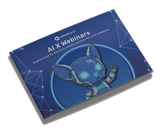
The practical guide to AI-powered webinars
Learn where AI can save time before, during, and after your webinar, with ideas you can put into practice right away.

Learn how to use AI with webinars
Read the blog and watch the video to discover practical ways to use AI for preparation, live engagement, and performance analysis.
The webinar software industry's top rated support
Consistently rated highly for usability and support, because when your webinar matters, reliability matters.


Latest feature releases
New
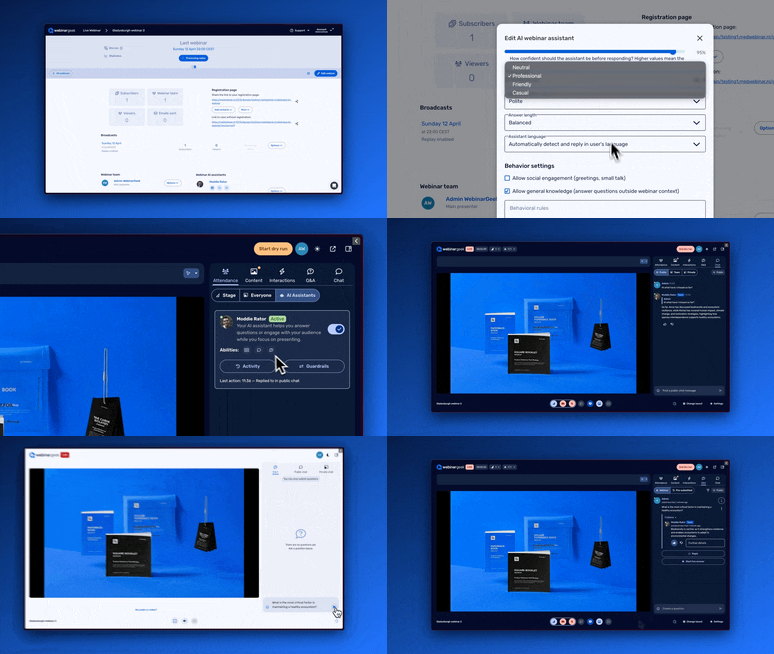
AI Assistant by your side
Add an AI Assistant to your live webinar who supports you by automatically answering questions from your audience or moving chat messages to the Q&A. This way, you can fully focus on your story while AI takes care of the rest.
Read moreFAQ
How does WebinarGeek use AI for webinars?
WebinarGeek uses AI to help before, during, and after your webinar. You can improve webinar content before publishing, support attendees during the live session with captions and translations, and turn the replay into summaries, chapters, transcripts, and follow-up content afterward.
How to use AI to summarize a webinar?
To use AI to summarize a webinar, start with a recording or transcript of the session. The AI can analyze the webinar content and turn it into a clear summary of the main topics, key takeaways, audience questions, and follow-up points. This helps your team review the session faster and gives attendees a quick recap without watching the full replay.
With WebinarGeek, you can use AI after your webinar to create summaries, chapters, transcripts, and follow-up content from the replay. This makes it easier to reuse your webinar content for emails, internal notes, blog drafts, or customer education. Instead of manually going through the full recording, AI gives you a structured starting point you can quickly review and adjust.
Can AI help improve webinar engagement?
Yes, AI can make webinars easier to follow with live captions, multilingual support, and smart chat assistance. After the webinar, AI summaries and replay chapters also help viewers quickly find the parts that matter most to them.
Does WebinarGeek create webinar summaries automatically?
Yes, WebinarGeek can use AI to create summaries from your webinar content. These summaries help your team review the session faster and give attendees a clear recap of the most important topics and takeaways.
Can ChatGPT summarize a webinar?
Yes, ChatGPT can summarize a webinar if you provide the right input, such as a transcript, notes, or a detailed outline of the session. It can help turn long webinar content into a shorter recap, highlight key points, create action items, or rewrite the summary for different audiences.
However, ChatGPT does not automatically access your webinar recording unless you provide the content yourself. A webinar platform with built-in AI, such as WebinarGeek, can make this easier by creating summaries, chapters, transcripts, and follow-up content directly from the webinar replay. That saves time and keeps the process closer to your actual webinar workflow.
Ready to see how it works?
Start a free trial and see how WebinarGeek works for you. No credit card required.