
How Many Reminder Emails Should You Send Before a Webinar?

Caroline
06 July 2026 - 4 min
Someone asked this on Reddit a while back, in one of the B2B marketing subs: how many reminder emails do you actually send before a webinar? Not a groundbreaking question on its own. However, the answers were very interesting.
They started with one reminder: whatever their platform fired off automatically an hour before start time. That got roughly 30% attendance. Adding two more reminders pushed it to 41%. Then they tried something different altogether: an insight-driven email seven days out, a poll three days before, a short case study the day before the event, and a bare join link an hour before it starts. Attendance landed at 58-62%.
Their conclusion was simple: people don't forget they registered. They just stop caring by the time the thing actually starts, and no reminder fixes that.
Short version, if you don't want to read the whole blog: three reminders, spaced around seven days out and again the morning of, will move your numbers. Getting past that plateau means changing what's in the emails, not how many you send.
So how many reminders actually help?
Timing matters more than most people assume. WebinarGeek's own numbers on invite scheduling back this up:
More than 24 hours before: 42% attendance.
Within 24 hours, but more than an hour before: 46% attendance, the strongest single window.
Only an hour before: 39% attendance.
Two reminder emails beat one, and the strongest combination is three days out plus the morning of. That's more or less what took the Reddit poster from 30% to 41%. Nothing mysterious, just better-timed nudges. Getting to 58-62% is a separate problem. Timing alone doesn't solve it.
Why do people sign up and then skip it anyway?
Not memory, usually. Two weeks between registering and the actual event is a long stretch, long enough for whatever made someone click "register" to get buried under everything else competing for their attention. A fourth "don't forget!" email doesn't bring that back. Something that reconnects them to why they signed up in the first place might.
What goes into a sequence like this
Roughly four emails:
Seven days out, send an insight. Something worth reading on its own, register or not. It puts the topic back in front of people before the inbox gets noisy again.
Three days out, ask something real. A poll, a genuine question, not a survey for the sake of having one. Answering something small tends to lead to committing to something bigger.
A short case study or concrete proof point lands well the day before, since that's roughly when people start quietly asking themselves whether this is actually worth their afternoon.
And an hour out? Just the viewing link. Plain, no dressing up. This is the one spot in the whole sequence where a boring reminder is exactly the right move.
None of this replaces the logistics emails. It just means not every email in the sequence is doing the same job.
Building this in WebinarGeek
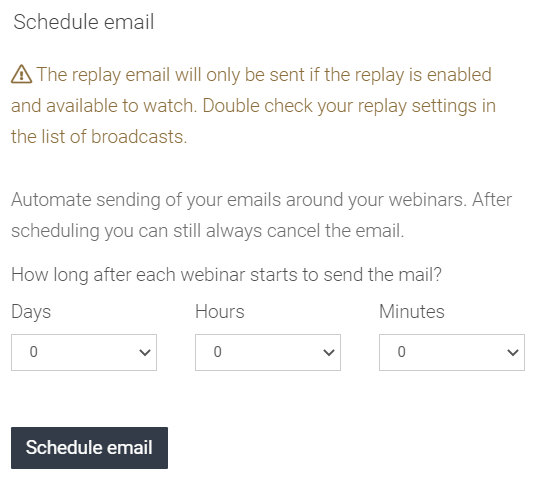
Nothing complicated about the setup. Email scheduling queues all four emails against your webinar date, timed to each person's own signup, so once it's built, it runs on its own. Skip the default reminder template for the value-driven emails. Write your own copy and brand it properly because a sequence like this falls flat if it reads like a form letter.
For the poll-style email, just ask the question directly in the email, or link out to something short elsewhere. Worth flagging: WebinarGeek's built-in poll interaction is meant for live use during the webinar itself, not pre-event emails, so that's not where this piece lives. You can also set up reminders for co-presenters and moderators if you want everyone working off the same date.
Build it once. Spend your actual effort on the writing, not the scheduling.
FAQ
How many reminder emails should I send before a webinar?
Three, spaced around seven days out and on the morning of. Beyond four, you're mostly adding noise, not attendance.
What's the best time to send a webinar reminder email?
Within 24 hours but more than an hour before the start, that's where the data peaks, at 46%. A reminder sent only an hour out actually performs worse than both earlier windows.
What should a webinar reminder email include?
The essentials: a title, date, time, and a viewing link people don't have to think twice about. Beyond that, at least one email in the sequence should give people something worth showing up for, not just a nudge that the event exists.
How do I increase webinar attendance without sending more reminders?
Trade a couple of reminders for actual content: a short insight, a real question, and a quick proof point. Attendance responds more to relevance than to repetition.
Why do people register for webinars but not attend?
Rarely forgetfulness. More often, whatever made the topic feel urgent when they signed up has faded by the time the event rolls around.
Explore webinar hosting today
Start free trialRelated articles
How to Reach a Bigger Webinar Audience with Restreaming
Restream your live webinar to LinkedIn, YouTube and Facebook. See what social viewers get, which webinars to restream and how to set it up.

Best Webinar Software for Marketing Teams
Marketing teams need more than a meeting tool. Here's how Livestorm, Demio, Zoom, ON24, and WebinarGeek compare on registration, email automation, CRM integrations, and GDPR compliance.
How to Convert B2B Webinar Attendees Into Real Pipeline
Two hundred people registered. Eighty actually showed up. Sales sent a follow-up to all eighty the next morning. Three replied. If you run B2B webinars, you've probably lived a version of this. The gap between attendance and pipeline usually gets blamed on bad follow-up. Most of the time, it isn't. More often, it’s a webinar follow-up problem.